
Account signup · Deployed
Signup & Mobile Number Format | Daman Game Guides
Signup field checks for a Daman Game account: country-code handling, digits-only mobile numbers, and OTP delivery to a handset you control.
These are independent field checks for the signup form. They are not the operator terms, and this site does not create the account.
- Topic
- Signup
- Field
- Mobile number
- OTP goes to
- Your handset
Register screen
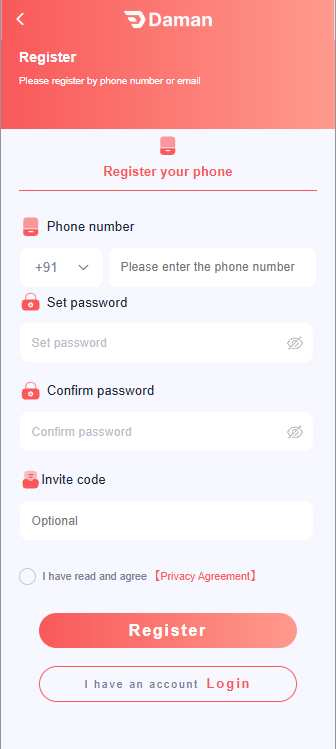
The header offers phone or email. The form in the picture is the phone path. Labels can move in a later build. Follow the words on your device when they differ. This site does not submit the form.
-
Phone number
The left control is the country code. Set it once, then type the national digits in the phone field. Do not type the country code a second time, and do not keep a leading 0.
-
Set password and Confirm password
The two fields have to match. Keep the password on this device. Do not send it to a chat, and do not email it to this site.
-
Invite code
The field is marked Optional. Leave it empty when you do not already have a code. Do not pay someone, or hand over the password, to get one.
-
Privacy Agreement
The checkbox is the agreement printed on that form. It is not this website’s privacy policy . Read it before you use Register.
-
I have an account
Use Login on that screen when the number is already registered. A second signup does not fix a wrong digit. Continue with login help if sign-in fails.
Field checks
-
Stay on the channel you already use
Open the signup form from the app or site you bookmarked. Do not complete a form that arrived in a message, and do not follow a lookalike address. Domain checks are on the safety page .
-
Fill only the required fields
Use details you control. Do not invent identity information to get past a check, and do not type someone else's number because they are nearby.
-
Set the country, then type the national number
If a flag or country control is already on the form, choose the country there. Type the national number after that. Do not add the country code a second time.
-
Keep the receiving handset online
The OTP goes to the number you typed. That SIM needs signal until the SMS arrives. The login page covers a code that does not show up: OTP troubleshooting .
-
Submit once, then wait
Wait two minutes before you send another code. Repeated taps are a common reason the next SMS is delayed.
Number format
Match the row to what you typed. Change one thing, then submit again. Do not cycle through several formats in a few seconds.
| What you typed | Why it fails | Type this instead |
|---|---|---|
| Country code plus the national number, while the flag is already set | The country code is sent twice. | Leave the flag on your country and type the national number only. |
| Spaces, dashes, or brackets copied from Contacts | The field is checking digits. | Digits only, unless the form itself inserts the separators. |
| A leading 0 on the national number | The 0 is often a local trunk prefix, not part of the stored number. | Drop that 0 and submit the remaining digits once. |
| Another person's number | The SMS arrives on their phone. | The SIM in the phone you are holding. |
| Letters, or an email in the mobile field | The control is validating a phone number. | The mobile number. Use a separate email field if the form has one. |
After the code is sent
Read the code from your own SMS app into the form. Do not forward it. If the message names a different product or a different domain than the one you opened, stop and use the safety checks before you type anything.
Signup questions
How should the mobile number be typed when a country flag is shown?
Set the flag to your country, then enter the national number as digits only. Do not type the country code again, and do not paste spaces or dashes from a contacts card.
What if the form rejects a number that starts with 0?
That leading 0 is often a local trunk prefix. Remove it and submit the remaining digits once. If it still fails, stop and recheck the country selected in the flag control.
What should I do if signup asks me to pay before the account exists?
Stop. Creating a login does not require a payment to this guide, and an unfamiliar page that demands a fee before the account exists is a reason to leave. Continue only on the channel you already use.